
Scheduling software for restaurants & cafés
Do the schedule in 20 minutes
— not on a Sunday night.
Build the week, watch the wage cost add up as you go, then text everyone their shifts. Instead of a spreadsheet and chasing cover on WhatsApp.
14 days free · then from €19/mo · no card needed
James
Head chef
Sarah
Sous chef
Olivia
Bartender
Emma
Waiter
Tom
Waiter
Wage cost, live
updates as you add shifts
Conflict caught
Tom's on leave — flagged
Replaces the spreadsheet, the WhatsApp group, and the printout on the fridge.
Payments handled by Stripe
Card details never touch our servers.
GDPR-compliant, EU-hosted
Your team's data stays in the EU.
Your data is yours
Export to CSV or delete everything, anytime.
Scheduling shouldn't eat your evening
Most places still run it off a spreadsheet and a group chat. So every week you're guessing who's free, missing that someone booked Friday off, and only finding out you went over on wages once payroll lands.
The Sunday-night way
- Build it in a spreadsheet, then photograph it into the group chat
- “Can anyone cover Saturday?” — sent to twelve, one replies
- Find out you overspent on wages only once payroll lands
- Put someone on a day they'd already booked off
With Skemaka
- Drag names onto the week — copy last week and tweak in seconds
- Publish once; everyone gets their shifts by text and in the app
- Watch the wage total add up before you commit to the week
- Skemaka flags time-off and availability clashes before you publish
How a week works

Staff send availability
They tap the days they can work from a link. No more asking around.
You build the schedule
Drag names onto days. The wage total adds up live, so an expensive week shows up before you publish it.
Publish — everyone knows
One tap texts everyone their shifts and puts them in the app. Nothing on the fridge.
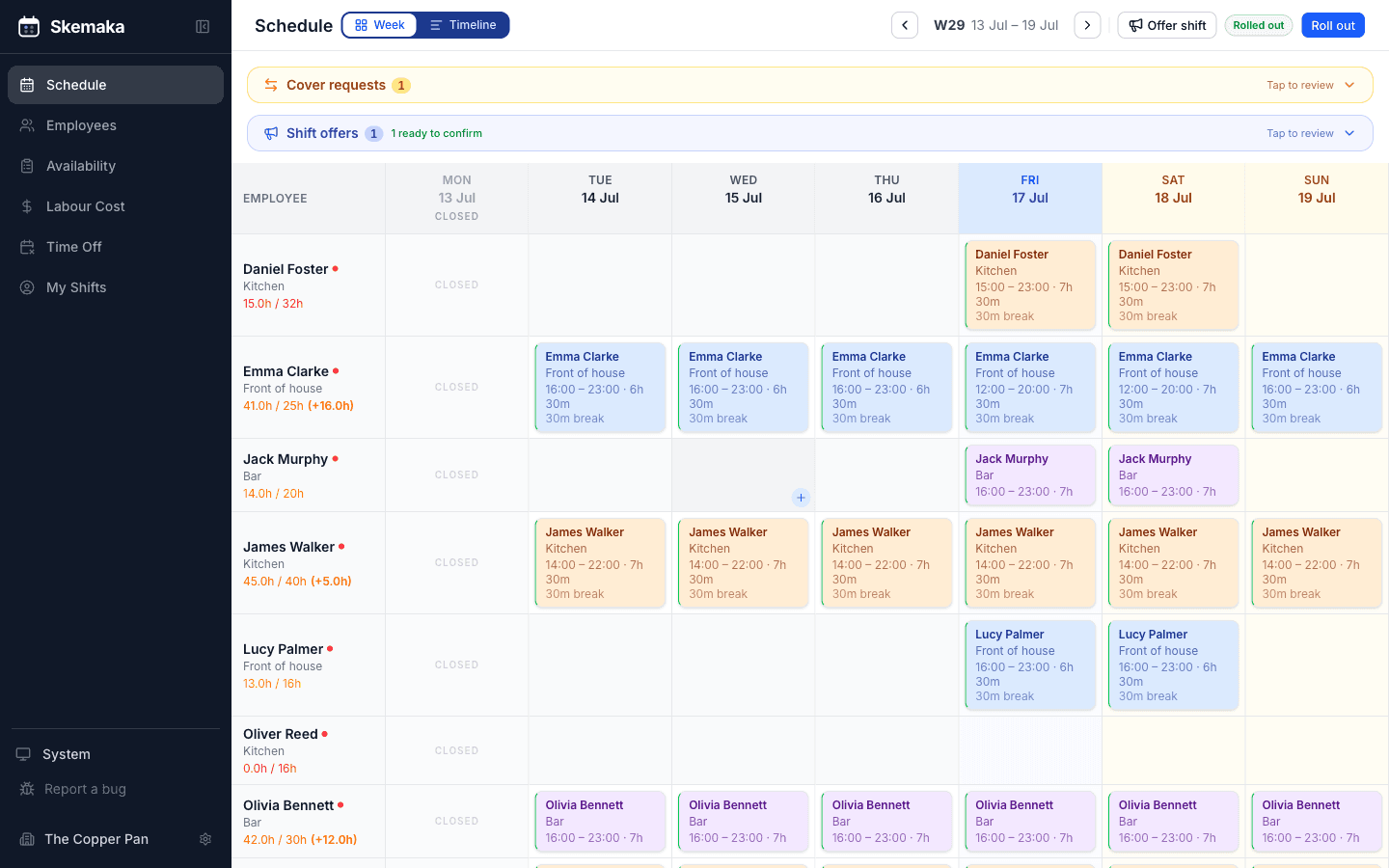
Build the schedule by dragging names
Drop people onto shifts. Copy last week and tweak it. It's the bit you do every week — so it's built to be fast, not clever.
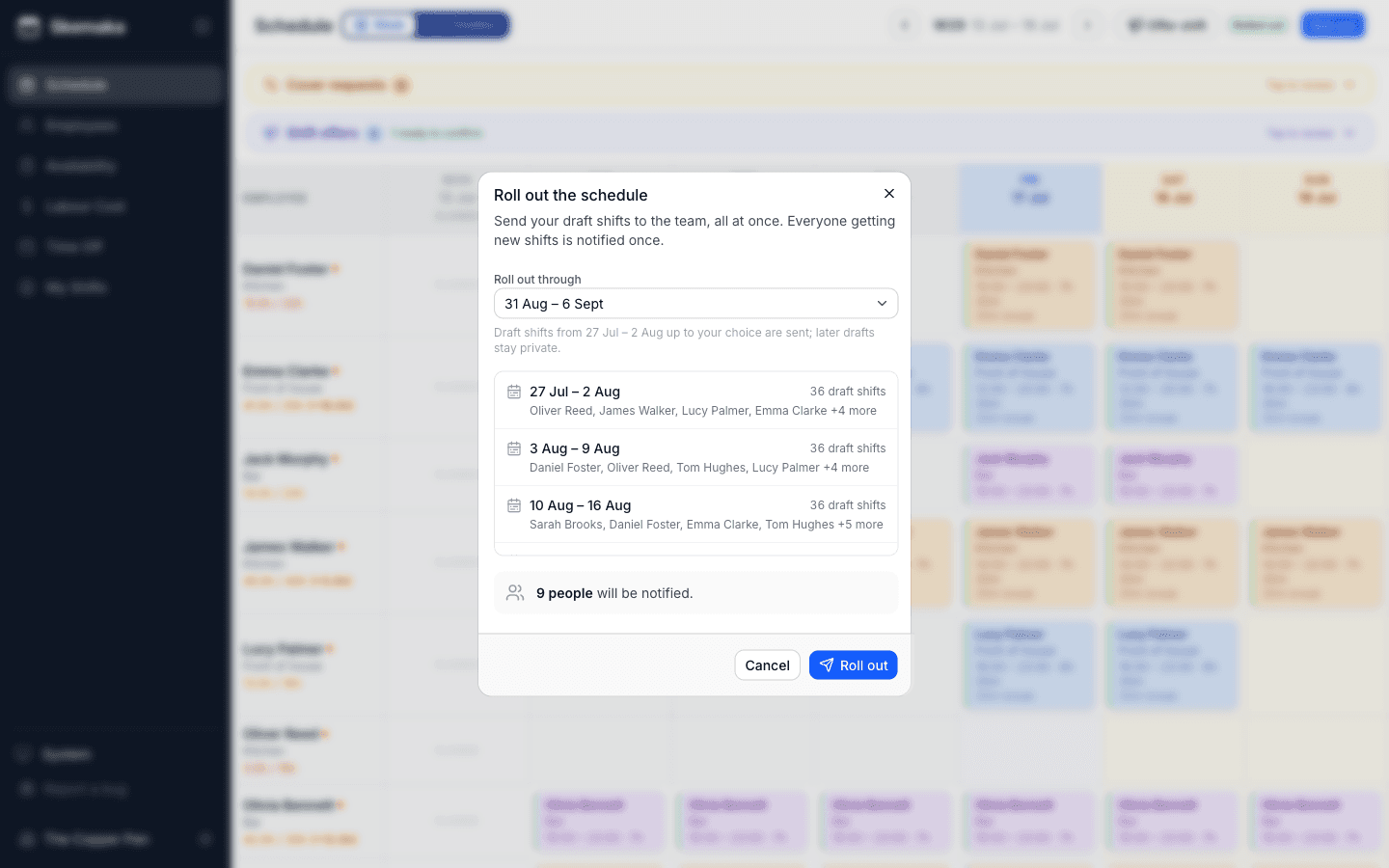
Plan months ahead — send it when you're ready
New shifts are private drafts only you can see. When the plan is right, one Roll out sends everything at once — and everyone gets exactly one message with their shifts.
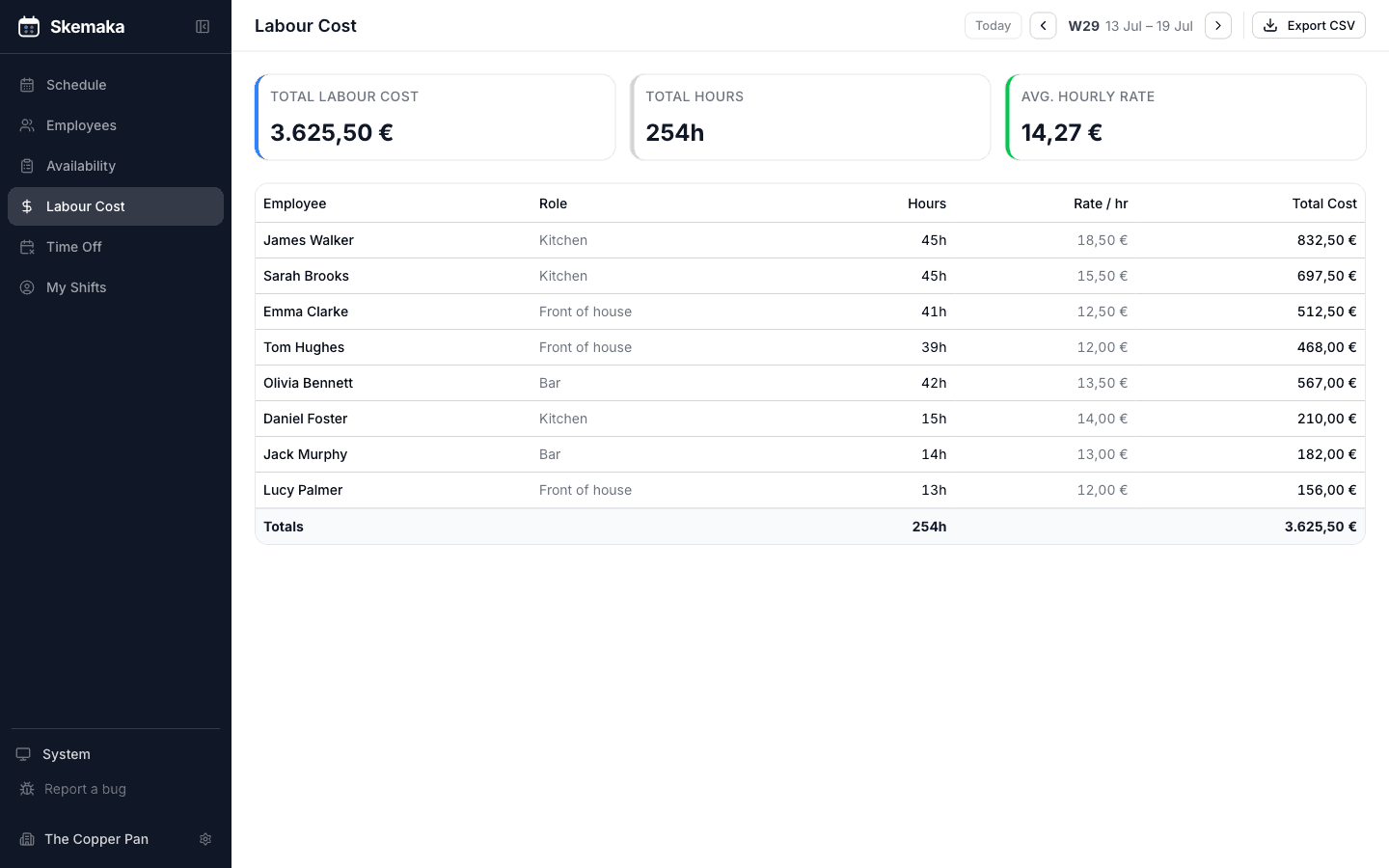
Know the cost before you publish
Every shift adds to the running wage total. Spot the heavy Saturday while you can still change it — not when payroll lands.
Catch problems before staff do
Put someone on a day they're off, or one they marked unavailable, and Skemaka tells you — before you publish, not after the complaint.
2 things to fix before publishing
- • Tom is on approved leave on Friday — but he's on the schedule.
- • Emma marked Saturday as unavailable — but she's on the schedule.
Everything a restaurant schedule actually needs
Live wage cost
The week's labour total updates as you place each shift.
SMS when you publish
Staff get their shifts texted to them — no group chat.
Availability & time-off
Staff send when they can work; requests land in one place.
Conflict warnings
Rostered someone who's off — or with under 11 hours rest since their last shift? Skemaka flags it before you publish.
Time registration & payroll
Clock-in records working time the way the 2024 Danish rules require, and exports hours and pay for the bookkeeper in one click.
Free staff app
iPhone and Android. Staff see shifts and clock in.
What you get back every week
Your evening — and control of the wage bill.
Hours back
~2 hrs → 20 mina week
Copy last week, drag a few names, publish. That's roughly 7 hours a month back from the spreadsheet and the group chat.
Money kept
Pays for itself
The wage total adds up as you build, so you catch the expensive week before payroll, not after. At €3.50/employee, trimming one over-staffed shift covers months of Skemaka.
Estimates based on a typical small venue — see your own numbers in the calculator below.
Simple, predictable pricing
€19/month covers up to 5 employees. Above that it's €3.50 per employee — no setup fee, cancel anytime.
Covers up to 5 active staff · then €3.50 each
14 days free — billed only for active staff
No credit card required
What will it cost me?
€19/mo minimum
€19/month
Covers up to 5 employees — you only pay more as you grow.
Questions owners ask
How do my staff get their shifts?+
You publish, and everyone gets a text with their shifts. They can also open the free app or a web link — no setup from them, no printing.
Do staff need to create an account?+
No. You add them, they get an invite link. They sign in with Google or Apple and they're in — most are set up in under a minute.
What does it actually cost?+
€19/month covers up to 5 employees, then €3.50 per extra employee per month. Need more? Add them straight away — you're billed for the rest of the month and it joins your normal bill after that. Reducing takes effect from your next monthly bill. No setup fee.
Can I export hours for payroll?+
Yes — the labour cost view exports to CSV with hours, wage, and total pay per employee, ready for your bookkeeper or payroll software.
Is there a contract?+
No. 14 days free with no card, then month to month. Cancel whenever — you keep access until the end of the period.
I run more than one venue.+
Each venue is its own workspace today. Multi-venue under one login is on the way — get in touch and we'll set you up.
Does Skemaka follow the Danish scheduling rules?+
Skemaka warns you before publishing if a shift breaks the 11-hour rest rule or exceeds a 13-hour working day, encourages the 4-week schedule notice the hospitality agreements expect, and records worked time as the 2024 working-time rules require. Wage rates under your collective agreement remain your responsibility.

Get next week's schedule off WhatsApp.
Try it on the demo restaurant, or start free with your own team.